|
      |
|||||||||||||||||||||||||||||||||||||||||||||||||||||
 |
Outlook 2000 |
|
|
|
|
||||||||||||||||||||||||||||||||||||||||||||||||
|
|
Home> Help> E-mail setup> Outlook 2000> |
Telephone: Address:
|
||||||||||||||||||||||||||||||||||||||||||||||||||
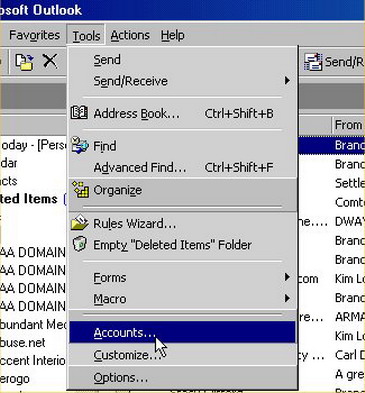
1. Go to Tools | Accounts
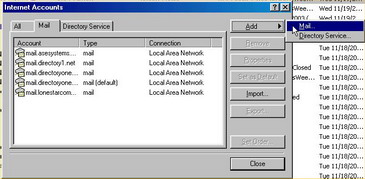
2. Click on Add | Mail
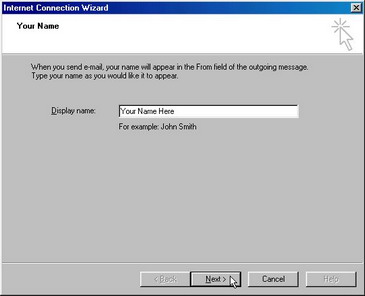
3. In Display Name, type whatever you want other people to see as your name. Click "Next"
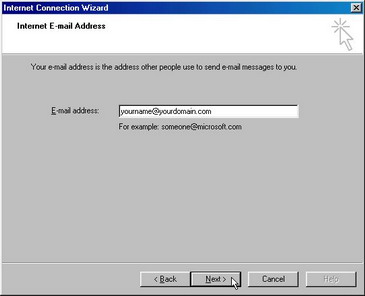
4. E-mail address: Type the email address you would like to send email from: yourname@yourdomain.com, then click "Next"
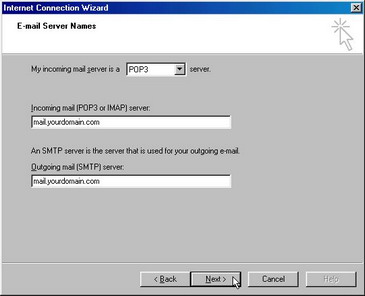
5. My incoming mail server is a "POP3".6. Incoming Mail (POP3 or IMAP) server: mail.yourdomain.com
|
|||||||||||||||||||||||||||||||||||||||||||||||||||||
|
|
|||||||||||||||||||||||||||||||||||||||||||||||||||||
| | Home | Business | Home / Office | Costs | Help | Contact us | | © abc2xyz
2007 |
||||||||||||||||||||||||||||||||||||||||||||||||||||
| abc2xyz Ltd of Weybridge provides IT Support in the Surrey Area:- Guildford; Kingston; Weybridge; Walton On Thames; Staines; Chertsey; Farnham; Farnborough; Heathrow; Leatherhead; Richmond. |
|
||||||||||||||||||||||||||||||||||||||||||||||||||||
|